Your members get the platform.You get the whole picture.
Every member of your organization gets a full JobTracker Pro account. You get a dashboard across all of them — attendance, progress, connections, referrals — plus coaches with their own teams, and you decide which of those capabilities your group uses at all.
Your organization is provisioned
We create it with your seat count, member license term, and the exact capabilities you want switched on.
You add your members
One at a time or a bulk roster upload. Each member gets a real account and takes one seat.
You run your group
Meetings, programs, referrals, one-to-ones — whatever your organization actually does, tracked as it happens.
Built for groups that already work this way
These aren't personas we invented. Each one runs on a ritual the module was shaped around — a weekly meeting, a defined engagement, a referral ledger, a cohort curriculum.
Two very different groups. The same platform.
A transition cohort measures progress toward a job. A referral chapter measures business passed between members. Both run here — you just switch on a different set of capabilities.
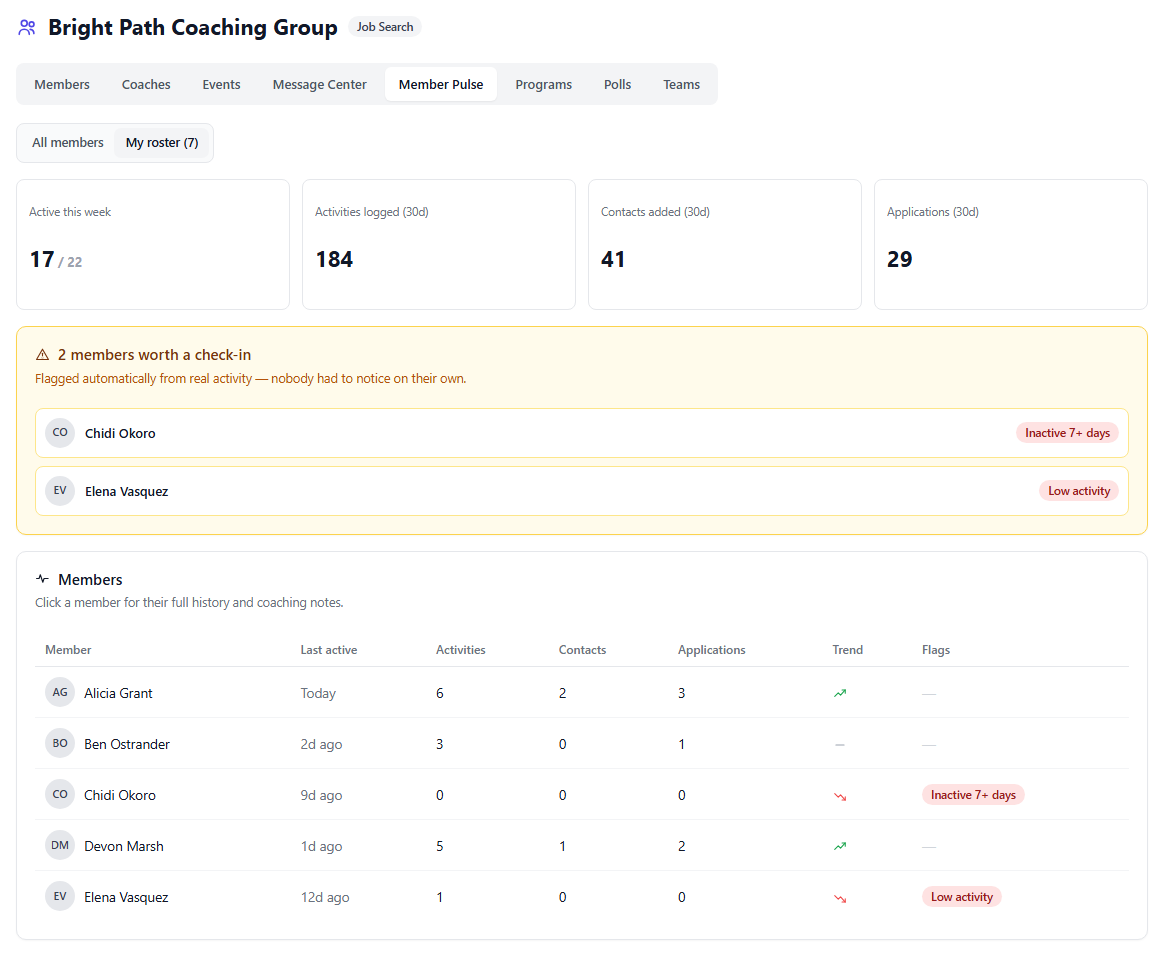
The person who hired you wants evidence the engagement is working. Member Pulse computes it from what participants actually do in the platform — no status meetings, no self-reported spreadsheet.
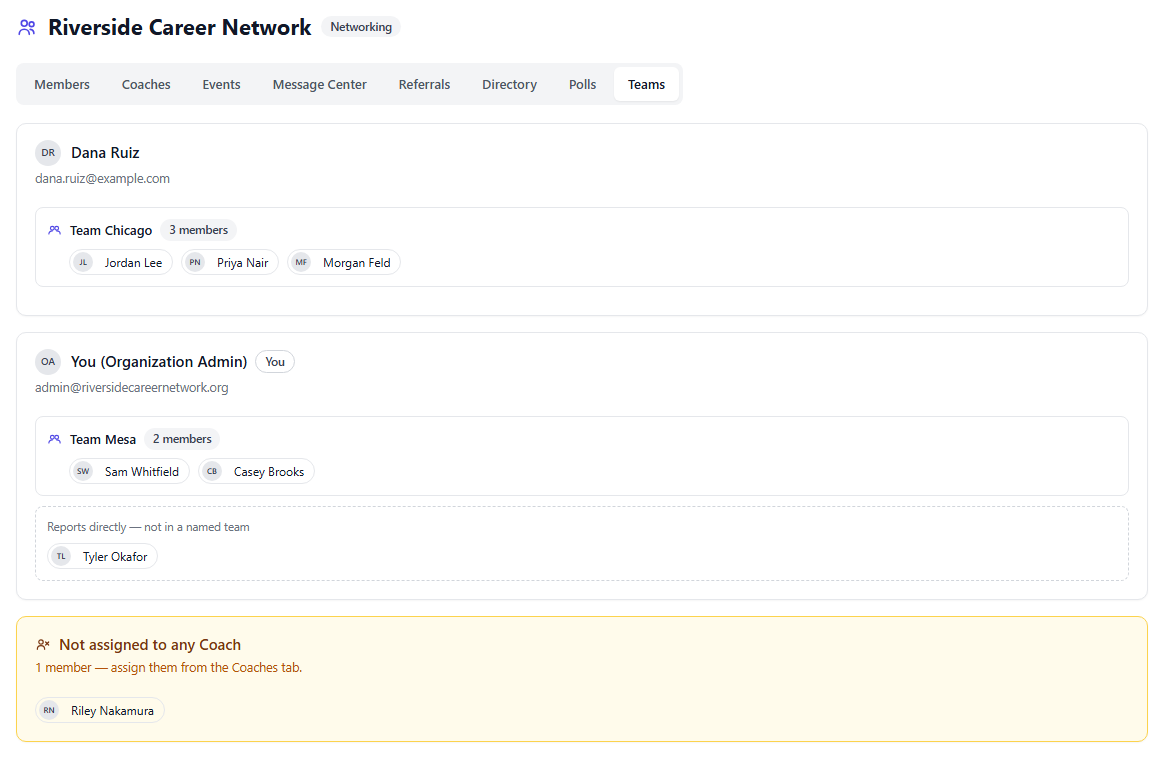
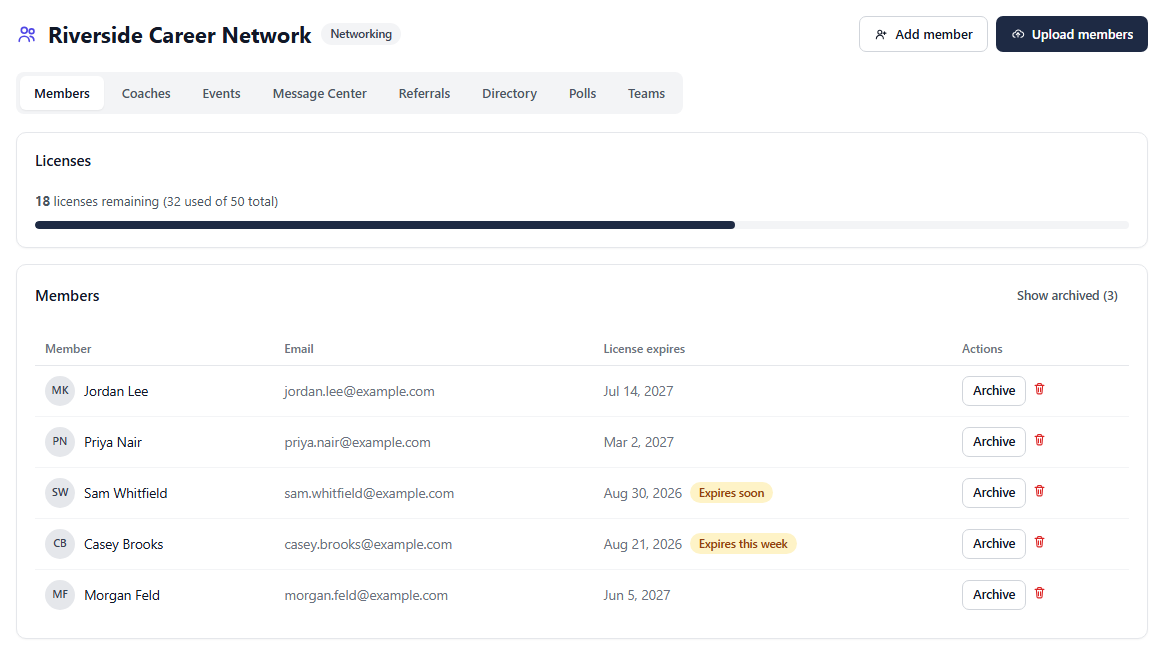
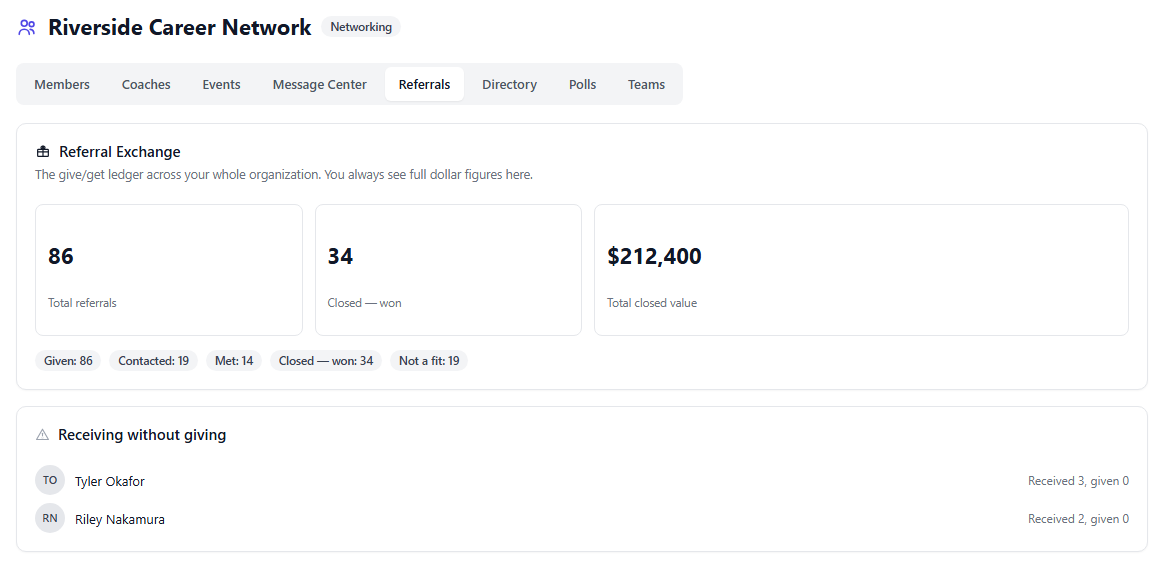
Members pay dues every year and decide whether to renew on a feeling. This turns that into a number — business passed, tracked through to what actually closed.
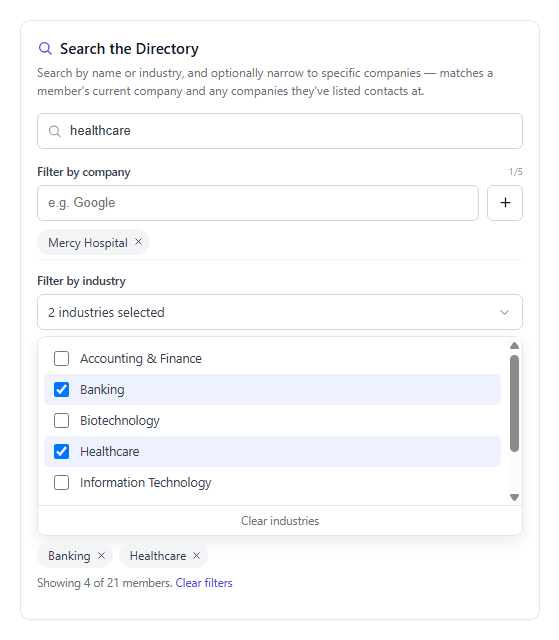
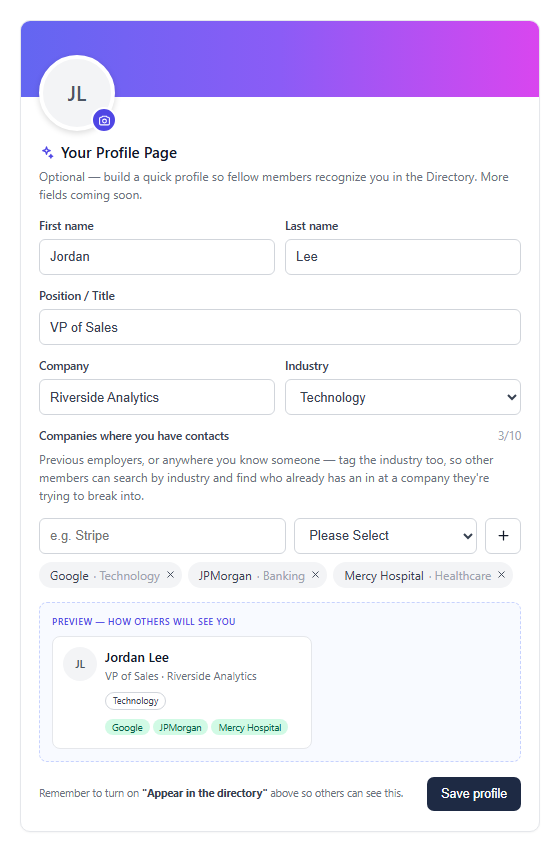
Members aren't logging into an admin tool. They get a full JobTracker Pro account, with your organization's activity layered onto the page they already use.
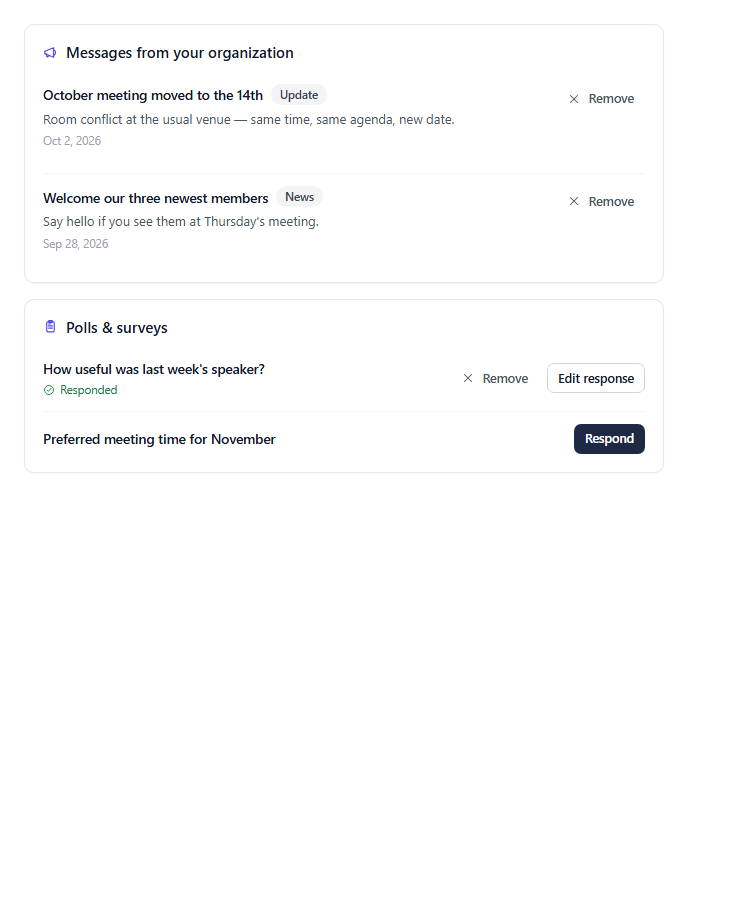
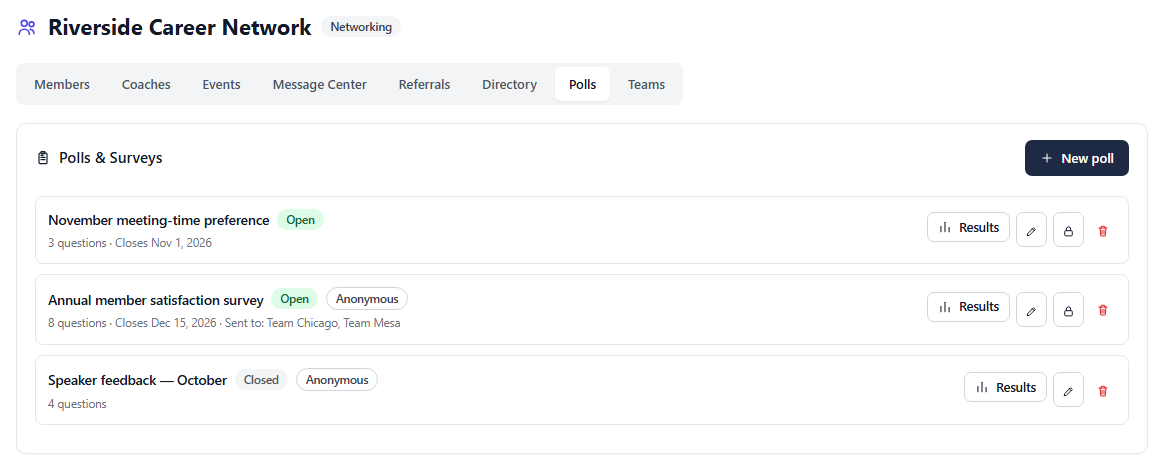
Screens shown with sample data. Member names, companies, and figures are illustrative.
Every capability, and what it's actually for
Four are always included. The other seven are switched on per organization, so your dashboard only ever shows what your group actually uses.
Members & Licensing
Add members one at a time or bulk-upload a roster. Each takes a seat with its own license term dated from their own start — not a shared renewal date.
- Seats and remaining licenses at a glance
- License terms of 3 months, 6 months, 1 year, or no end date
- Archive a member reversibly, or permanently retire a license
- Bulk roster upload — only an email column is required
Leaders, Coaches & Teams
A tier between you and your members. Invite a leader outright or promote an existing member, then give them a named team — they see and coach only the people assigned to them.
- Call the role whatever your group calls it — Leader, Coach, Facilitator
- Promote an existing member in place: they keep their login and their history
- Named teams, or members assigned directly to a leader
- Each leader's dashboard is scoped to their own roster, enforced by the platform
- A Teams view showing every team, its leader, and its full roster at a glance
- Send an event, message, or poll to specific teams instead of everyone
- Grant an individual leader permission to create events or send messages themselves
Message Center
Broadcast updates, news, or encouragement to every member at once. Messages appear on each member's own overview page.
- Typed messages: update, news, info, or inspiration
- Reaches every current member automatically
- No separate mailing list to maintain
Organization Calendar
Create an event once — including a recurring weekly meeting — and it appears on every member's own calendar, read-only.
- One-time or fully recurring events
- Lands on every current and future member's calendar
- Attach a flyer, agenda, or other document directly to the event
- Visually distinct from members' own personal events
Meeting Engagement
Turns a calendar entry into a full attendance loop: RSVP, check-in at the door, and a next-morning prompt to capture who each member actually met.
- Members RSVP going / maybe / can't make it
- Self check-in opens 30 minutes before, or the organizer checks people in from a live roster
- Walk-ins who never RSVP'd can be added at the door
- "Who did you meet?" the next morning creates real, properly tagged contacts
- Attendance rates, streaks, and a flag when a regular stops showing up
Best for: Job clubs, networking organizations, career ministries
One-to-One Coordinator
The mesh only forms when members meet each other individually. This tracks who's met whom, and suggests who to meet next.
- Coverage: "you've met 12 of 40 members"
- Pairing suggestions weighted toward new members and longest-unmet
- Scheduling writes to both members' calendars at once
- Mesh density for the admin — the share of all possible pairs who've met
- New-member integration tracking through the first 90 days
Best for: Networking organizations, referral clubs, job clubs
Referral Exchange
The give/get ledger referral groups run on — from the referral passed, through to the closed business it produced.
- Give a referral to a fellow member with context and an estimated value
- The receiver advances it: contacted → met → closed
- Closing records the real dollar value — the "thank you for closed business" moment
- Leaderboard ranks by referrals given, never received
- A flag for members receiving without giving back
- Dollar-value visibility to members is your choice, and off by default
Best for: Networking organizations, referral clubs, chambers
Member Pulse
Visibility into how members are actually doing between sessions — with automatic flags and private coaching notes.
- Cohort summary: who's active this week, activity and contact volume
- At-risk flags: dormant, never started, search stalled, network cooling, license lapsing
- Per-member metrics with a 7-day trend
- Private coaching notes, admin-only and never visible to the member
- Only ever shows the categories your organization is configured to see
Best for: Career coaches, executive coaches, transition firms, career centers
Member Directory & Warm Intros
An opt-in directory that answers the question a group exists to answer: does anyone here know someone at my target company?
- An optional member profile: photo, title, company, industry, and a short pitch of what they do
- Members list up to 10 companies they have contacts at, each tagged by industry
- Search the whole membership by name, company, or several industries at once
- Three separate opt-ins, all off by default
- The system checks other members' contacts server-side and returns a count only — never a name
- Counts of one are suppressed, so a single match can't identify anyone
- The holder chooses: reveal, relay anonymously, or decline — and declines are silent
- The admin sees participation and success rates only, never the requests themselves
Best for: Every organization type, once there's an active membership
Polling & Surveys
Ask your members something and get an answer you can act on — meeting times, speaker feedback, an annual satisfaction survey.
- Multiple choice, rating, and open-text questions in one poll
- Anonymous by default, or identified when you need to follow up
- Send to the whole organization or only to specific teams
- Optional close date, or leave it open
- Aggregated results with a respondent roster showing who hasn't answered yet
- Save as a draft and publish when you're ready
Best for: Every organization type — especially membership groups reporting to a board
Programs & Milestones
Structured multi-week programs where milestones complete from real activity rather than a checkbox someone ticks.
- Build a program once and run it with any number of cohorts
- Milestones anchored to relative weeks, so cohorts starting different months track independently
- "Add 20 contacts" reads the actual contact count — verified, not claimed
- Members see current week, what's outstanding, live progress, and a streak
- The admin sees where the whole cohort stalls, not just individuals
- Optionally generates a weekly calendar check-in for each milestone week
Best for: Transition firms, career coaches, job clubs, career centers
What we'd typically turn on for you
A starting point, not a rule — every capability is switched independently, and you can change your mind at any time.
| Organization type | Members & Licensing | Leaders & Teams | Message Center | Organization Calendar | Meeting Engagement | One-to-Ones | Referral Exchange | Member Pulse | Directory & Intros | Programs | Polls & Surveys |
|---|---|---|---|---|---|---|---|---|---|---|---|
| Career Transition Firms | — | — | |||||||||
| Career Coaches | — | — | — | ||||||||
| Executive Coaches | — | — | — | — | — | — | |||||
| Job Clubs | — | ||||||||||
| Career Ministries | — | — | |||||||||
| Networking Organizations | — | ||||||||||
| Referral Clubs | — | — | |||||||||
| University Career Centers | — | — |
Your members' data stays their own
Members are people with their own careers, not records in your database. The module is built so that being part of an organization never quietly costs someone their privacy.
- You choose which categories of member data your dashboard can see — and members are shown that list plainly on their own account page.
- Directory participation is three separate opt-ins, every one of them off until the member turns it on.
- Introduction requests reveal a count, never a name. The person holding the connection decides whether to surface themselves at all.
- Referral details are visible to the two members involved. Dollar figures are private from other members unless you deliberately publish them.
- Members keep everything they build. Removing someone from your organization ends their access, not their contacts or their history.
Let's set up your organization
Tell us how your group runs and which capabilities matter, and we'll provision it with your seats, license terms, and features already configured.
Questions, answered
What organizations ask before they sign up.
Licensing for organizations
Every group licenses seats for its whole membership or roster — and gets a dashboard across all of them. You choose which capabilities your organization uses, and longer commitments cost less per month.
Career Transition / Job Search Organizations
| Active Participants | 1 Month | 3 Months | 6 Months | 1 Year |
|---|---|---|---|---|
| Up to 15 | $199 | $567 | $1,075 | $1,990 |
| 16–25 | $299 | $852 | $1,615 | $2,990 |
| 26–50 | $599 | $1,707 | $3,235 | $5,990 |
| 51–100 | $899 | $2,562 | $4,855 | $8,990 |
| 101–250 | $1,399 | $3,987 | $7,555 | $13,990 |
| 251–500 | $1,999 | $5,697 | $10,795 | $19,990 |
| 500+ | Contact Us | Contact Us | Contact Us | Contact Us |
Networking Organizations
| Active Members | 1 Month | 3 Months | 6 Months | 1 Year |
|---|---|---|---|---|
| Up to 25 | $199 | $567 | $1,075 | $1,990 |
| 26–50 | $279 | $795 | $1,507 | $2,790 |
| 51–100 | $399 | $1,137 | $2,155 | $3,990 |
| 101–250 | $699 | $1,992 | $3,775 | $6,990 |
| 251–500 | $999 | $2,847 | $5,395 | $9,990 |
| 500+ | Contact Us | Contact Us | Contact Us | Contact Us |
Registered nonprofits are free up to 25 people — contact us to verify eligibility · Cancel or change your plan anytime · Prices in USD